Last updated: July 17, 2026
Why Covering PDF Text with a Black Box Is Unsafe Redaction
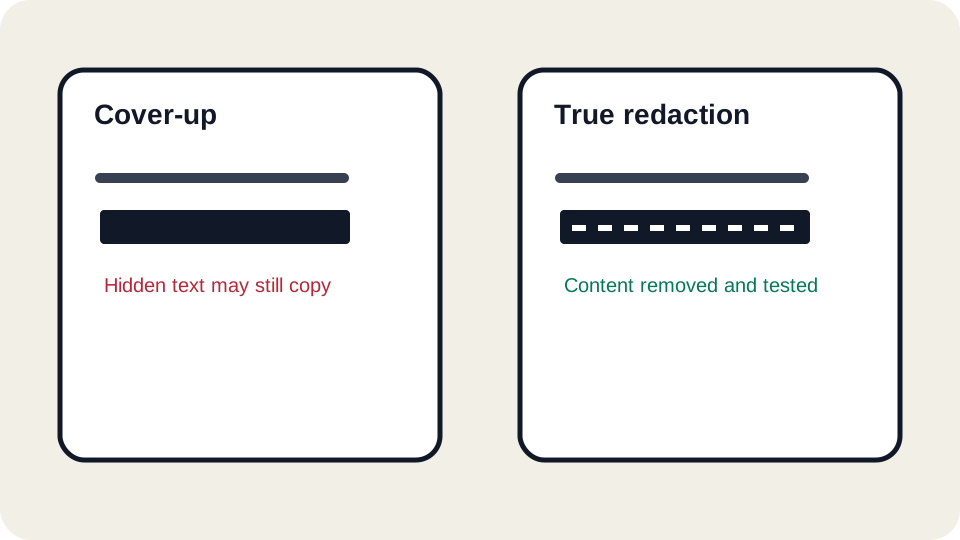
Drawing a black rectangle over sensitive text can make a PDF look redacted while leaving the original text underneath. Anyone who can select, copy, search, inspect layers, or remove annotations may still recover the hidden words. This is one of the most serious mistakes in everyday PDF editing because it creates a false sense of security.
Covering is not deleting
A PDF page is made of objects: text, images, paths, annotations, form fields, and metadata. When you draw a rectangle on top of text, you usually add another object above the original content. The original text can still exist in the file. It may still be searchable. It may still copy to the clipboard. It may still be visible in a different layer order or after annotations are removed.
True redaction removes the underlying content from the PDF and usually also removes related hidden data. That is a specialized operation. A visual cover is useful for marking an area during review, but it should not be treated as final redaction for confidential information.
How the mistake is discovered
- Someone searches for a hidden name and the viewer finds it behind the box.
- Copied text includes the supposedly redacted phrase.
- A recipient removes the annotation or opens the file in a tool that exposes layers.
- The black box shifts during export, revealing part of the content.
- Metadata, comments, or attachments still contain the same private information.
Safe redaction decision table
| Scenario | Risk | Safer approach |
|---|---|---|
| Hiding a Social Security number, account number, or medical detail | High | Use a true redaction tool or recreate a clean document without the data. |
| Marking text for an internal reviewer | Medium | Use visible highlights or boxes only as review marks, not final removal. |
| Removing a client name before public sharing | High | Search, redact, and inspect metadata and attachments. |
| Covering a typo before printing a personal copy | Low | An overlay may be acceptable if the file is not shared as a redacted record. |
Test a redaction before trusting it
- Search for the hidden word in the final PDF.
- Try selecting and copying around the covered area.
- Open the file in a second viewer.
- Inspect comments, annotations, and attachments.
- Check document properties and file metadata.
- If the information is high-risk, use a specialist redaction workflow rather than a general editor.
Why flattening is not always enough
Flattening can reduce some annotation risks by merging visible objects into a page appearance, but it is not a universal redaction method. Depending on the tool, underlying text may remain, OCR text may remain, metadata may remain, or another representation of the page may preserve content. If the data must be removed, verify with a tool designed to remove it, not just cover or flatten it.
Better workflows for different risk levels
For low-risk visual cleanup, an overlay can be fine. For example, covering a scratch mark in a copy that only you will print is not the same as hiding confidential data from a third party. For client, legal, HR, financial, government, healthcare, or public-record documents, use true redaction and keep a record of the clean copy.
Sometimes the safest method is to rebuild the PDF from a source that never contains the sensitive data. For example, export a public version of a report from the original document with confidential columns removed, rather than exporting the full version and trying to cover those columns later.
How JUST FREE PDF should be used around redaction
JUST FREE PDF can help with visual edits and practical review, but it should not be described as an enterprise redaction product. If you use it to mark areas that need removal, treat that as a preparation step. Before sharing the final file, use a proper redaction process and verify that the original content cannot be searched, selected, copied, extracted, or found in metadata.
Redaction review checklist
- List every sensitive term before editing: names, IDs, addresses, account numbers, case numbers, and project names.
- Search the final PDF for those terms.
- Check repeated occurrences, headers, footers, watermarks, comments, and attachments.
- Open the file in a different viewer and try copy/paste around redacted areas.
- Keep the unredacted original separate and label the public copy clearly.
FAQ
Is a white box safer than a black box?
No. The color does not matter. The problem is leaving the underlying content in the file.
Can screenshots be safer?
A screenshot of a properly redacted page may remove selectable text, but it can reduce quality and accessibility. It also does not address other pages, metadata, or attachments unless the whole workflow is controlled.
What if I only need to hide information from casual viewing?
Use an overlay only when the risk is low and the file is not being shared as a confidential or legally redacted document. For anything sensitive, use true redaction.
Recorded extraction result
The black-box sample looked covered but still exposed the synthetic number 0000-1111-2222 to text extraction. The applied-redaction sample did not. Review and reproduce the test.
JUST FREE PDF is not certified legal redaction software. Do not use a visual overlay to release sensitive legal, medical, financial, identity, or client records.