Last updated: July 17, 2026
Edit PDF Text Online
A date correction can look perfect in the editor and still shift after export because PDF text is positioned, not reflowed like a word-processor paragraph. JUST FREE PDF is designed for small, authorized source-text corrections that stay close to the original width—not for rewriting signed records or rebuilding complex layouts.
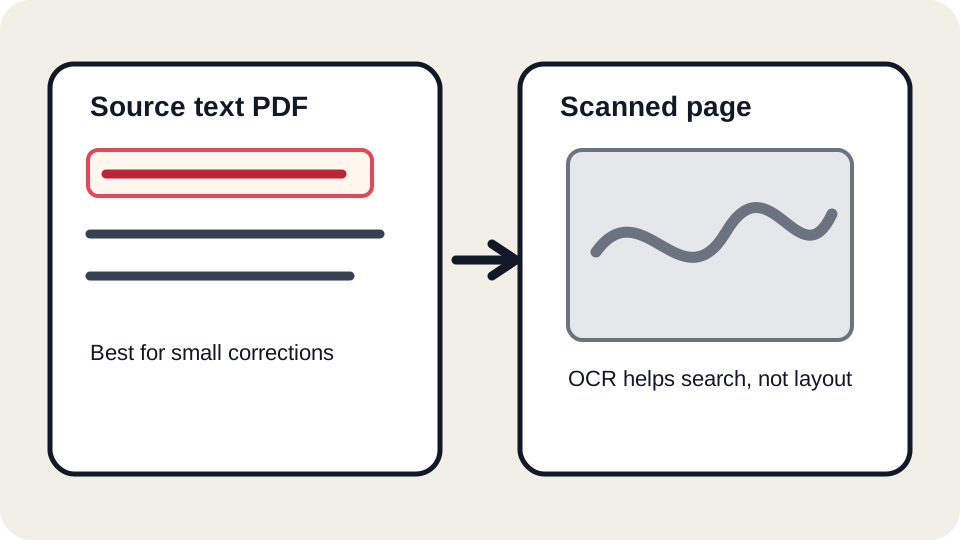
What this tool can edit
A PDF is made from drawing commands, text objects, images, forms, fonts, and page coordinates. When a page contains selectable text objects, JUST FREE PDF can often open those text areas as editable blocks. You can change wording, review wrapping, and download a new file. This works best when the replacement text is close to the original length and the PDF uses common fonts.
Examples that usually work well include correcting a misspelled name in a draft agreement, adjusting a short invoice note before sending it to a client, updating a label on a training handout, or fixing one line in a school form. These are everyday corrections where the surrounding page structure should stay mostly the same.
What this tool cannot safely edit
Some PDFs look like text but are not safe to direct-edit. Scanned PDFs are images of pages. OCR may add a searchable text layer, but that layer is not the original layout. Protected PDFs may block extraction or export. Some documents use embedded font subsets that do not contain every replacement letter. Other files draw text as outlines, which means the letters are shapes instead of editable text objects.
- If the text cannot be selected cleanly, treat the file as scanned or image-based.
- If the replacement text is much longer than the original, expect wrapping changes.
- If the document is a legal, medical, financial, or government record, review the exported file in a second PDF reader before submitting it.
- If the change affects a signed or certified document, use the official source file or a compliant e-signature workflow instead.
How to edit PDF text with JUST FREE PDF
- Open the homepage and choose your PDF file.
- Wait until the editor finishes reading the pages. The status message should change from Opening PDF to the editing view.
- Click the text block you want to change. Make a small edit rather than rewriting the whole page.
- Look at the surrounding lines, page margins, list alignment, and any nearby form fields.
- Download the edited PDF and open it in a second reader such as Adobe Acrobat Reader, Apple Preview, Chrome, or Edge.
Small edit or rebuild?
| Situation | Recommended workflow |
|---|---|
| Fixing one typo or short phrase | Use direct text editing and review the export. |
| Replacing a full paragraph | Use the original source document when possible. |
| Changing a scanned page | Use OCR for search, then rebuild or annotate carefully. |
| Changing a signed file | Do not alter the signed PDF unless you understand the legal effect. |
Common problems after editing
Font substitution can make replacement text slightly wider or narrower. A line may wrap earlier than expected. Some PDF viewers show form fields differently after export. Browser zoom can hide a small visual problem until the file is opened elsewhere. These are normal PDF editing risks, not just JUST FREE PDF risks, so the review step matters.
Before downloading
- Compare the edited line with the surrounding text size and baseline.
- Check page numbers and list numbering after the edit.
- Make sure no text overlaps a signature, stamp, table border, or form field.
- Keep the original PDF until the recipient confirms the edited file is accepted.
- Avoid using direct editing to misrepresent official records, invoices, certificates, or identity documents.
Measured text-width evidence
In our July 17 synthetic test, a short Helvetica line measured 146.72 points while a longer replacement measured 408.18 points—178.2% wider. This is why we recommend small edits and a second-viewer check. Read the measured layout test or download the short and long samples.
Do not use this tool to deceptively alter a signed, official, identity, financial, medical, academic, or legally controlled record. Return to the authorized source or official workflow.
FAQ
Why can I select text but still not edit it cleanly?
Selection only means a text layer exists. The font, encoding, text grouping, and page coordinates may still make a clean edit difficult.
Can I rewrite an entire PDF page?
You can try, but a full rewrite is usually better done in the original source document or a layout editor.
Does privacy-conscious mean no server is ever involved?
No. JUST FREE PDF is designed to reduce unnecessary transfer where practical, but some analysis, export, logging, optional services, or future features may involve server requests. Read the Privacy Policy for the current boundary.
Should I edit contracts this way?
Only for drafts or non-sensitive corrections where you have authority to edit. For signed or legally binding files, use the official workflow.